How to import chords from a website with Share or copy and paste
On a chord page in Safari, tap Share and choose GetChords. GetChords opens at Found a song with the chords above the words. From another browser, copy the chords and lyrics and tap Import, then Paste. The page is read on your device and nothing is downloaded.
GetChords is coming to the App Store for iPhone, iPad and Mac. The guide names every button as the app shows it.
You need GetChords on an iPhone or iPad with iOS 26 or later, or on a Mac with macOS 26 or later. A page with the chords above the lyrics, or the same as text in a note or a message.
-
Open the chord page in Safari
Find the song on a chord site and open it in Safari. A page that shows the chords above the lyrics as text works best. If you select part of the page, only the selection goes to GetChords.
-
Share it to GetChords
Tap the Share button in Safari and choose GetChords. If it is not in the row of apps, swipe to the end and tap More. GetChords opens straight at Found a song.
-
From another browser, copy and paste
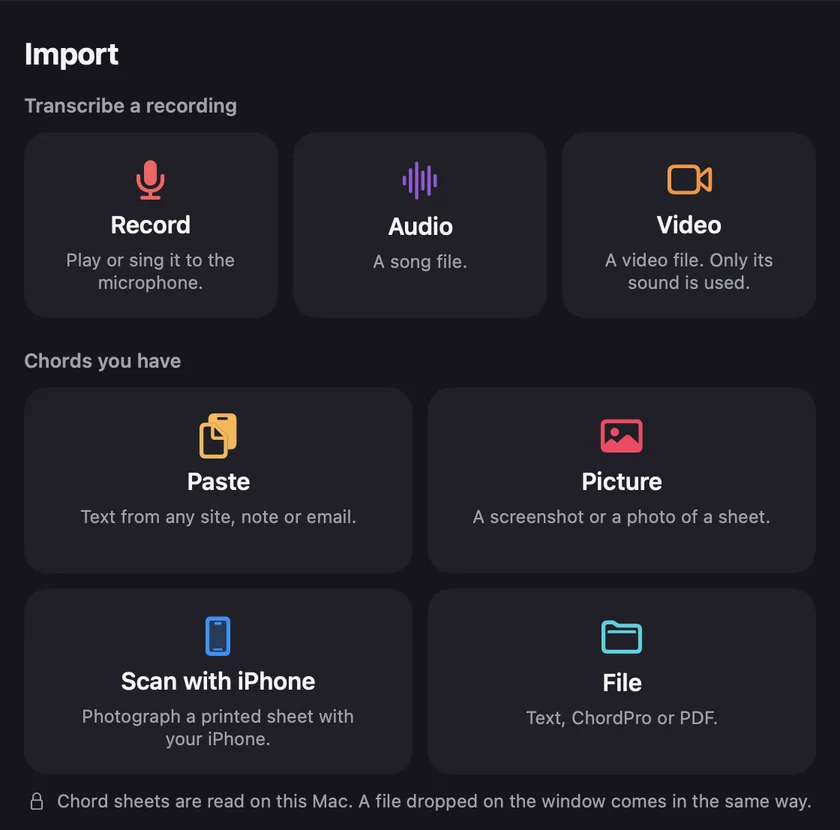
Most other browsers share only the address. GetChords then says Only a link came, because it needs the chords as text and never loads the page itself. Select the chords and lyrics on the page and copy them. In GetChords, tap Import, then Paste ("Text from any site, note or email."). In Paste a sheet, tap the Paste button and then Read. The same works for chords in Notes, Mail or Messages.
-
Check what GetChords found
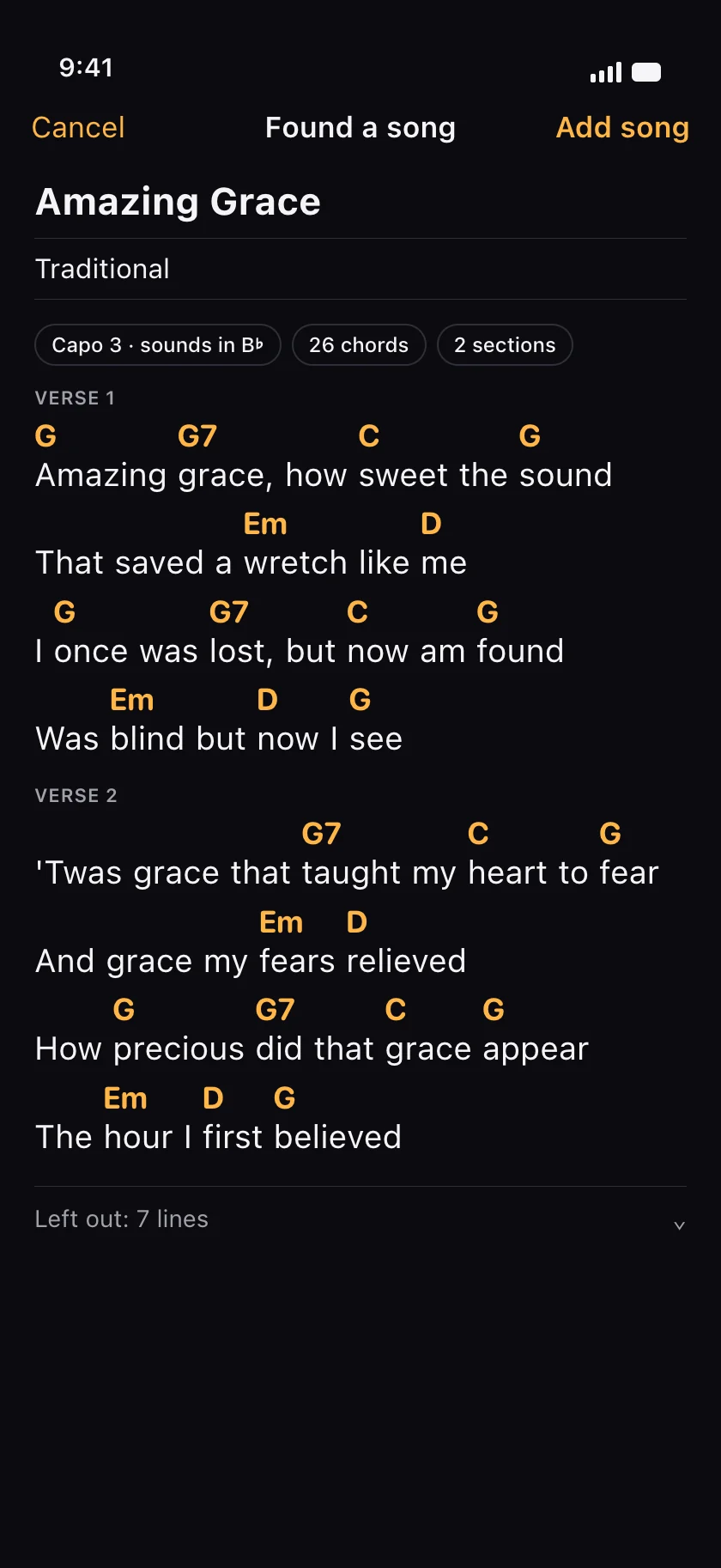
Before anything is saved, Found a song shows what GetChords kept: Title and Artist as fields you can change, chips such as Capo 3 · sounds in B♭, the number of chords and sections, and the first lines as the sheet will show them. Left out: 7 lines opens the lines that did not make it, such as menus and comments. GetChords never rewrites a word: every word on the sheet is in your text, in the same order.
-
Add the song
Tap Add song. The sheet opens with section names such as Verse and Chorus above their lines. A sheet without a recording scrolls when you tap the middle button at the bottom, at the speed under Scroll. Transpose, capo, chord diagrams, folders and export work as for any song, and so does a tap on a chord to change it.
-
On a Mac
Copy the chords and lyrics in any browser. In GetChords, choose Paste from Clipboard in the + menu or Import from Clipboard in the File menu (⇧⌘V).
Mac
-
How do I copy chords from a website into an app?
In Safari, share the page to GetChords. In any other browser, select the chords and lyrics, copy them, and use Import, Paste in GetChords. Either way GetChords shows what it found before it saves anything. It reads the text you give it and does not download anything from the site.
-
Can I paste chords from Notes or a message?
Yes. Copy the text and use Paste, or share it from Notes, Mail or Messages to GetChords. A text with chord lines above lyric lines works like a web page.
-
Why did only a link come in when I shared the page?
Most browsers other than Safari share only the address, and GetChords never loads a page itself. Share the page from Safari, or copy the chords and use Paste.
-
What if the text has lyrics but no chords?
The review says Lyrics only and offers Add lyrics. You get a sheet without chords, and a tap on a word puts a chord on it.
-
Can I keep my chord sheets offline?
Yes. Imported sheets are stored on your device and open without a connection. Reading the pasted text works offline too. With iCloud, the sheets also reach your other devices.
-
Can I turn a pasted chord sheet into ChordPro?
Yes. Add the song, tap the Share button and choose ChordPro. The ChordPro guide explains the format.
-
How do I send a chord sheet to my band?
Open the song and tap the Share button. Link sends a link that opens the song in GetChords, and QR code shows a code to scan with an iPhone camera. PDF is for printing or sending, and ChordPro is for other apps. Only the chords and words go along, never the recording. Someone without GetChords who opens the link gets a page with the App Store button and nothing of the song.
-
Does an import count as a song?
It counts toward the 25 free songs, but not toward the 20 songs a day, which count recordings and audio files.
GetChords keeps the chord sheets you find online with the songs you recorded, transposes them and puts a capo on them. It has no subscription and no account.
Coming to the App Store
- How to turn a photo or screenshot of a chord sheet into chords you can editGuide
- How to open a ChordPro (.cho) file or a PDF chord sheetGuide
- How to transpose chords and find the right capo fretGuide
- Your chord sheets on iPhone, iPad and MacGuide
Written for GetChords 1.0. Button names are the ones the app shows.